






Why separate audio tracks matter, and what to ask for
Separate audio tracks decide whether a podcast episode can be fixed after the fact. A mixed stereo file locks every voice together at recording. Separate tracks keep each voice as its own track, so a quiet guest, crosstalk, a cough on one mic, or a voice needing different EQ can each be repaired without touching the rest. At Kreate Vision Studio in Palatine, Illinois, every Podcast Recording booking, $250 an hour with a 90-minute minimum ($375), includes the live cut the same day and the separate raw tracks after the session.
The file that decides whether an episode is fixable later
A separate, or multitrack, recording gives an editor each voice as its own track, so a problem on one voice can be fixed without touching anyone else’s audio. A single mixed stereo file glues every voice together the moment it is recorded, and once that happens, most problems in it are permanent. This is what people mean by multitrack podcast recording: one track per voice instead of one blended file for the whole conversation.
That is the real question behind “what files should I get from a podcast studio.” Everything else, the live cut, the camera angles, the file names, sits downstream of whether the audio underneath them was kept separate.
What “separate” means, versus a mixed file
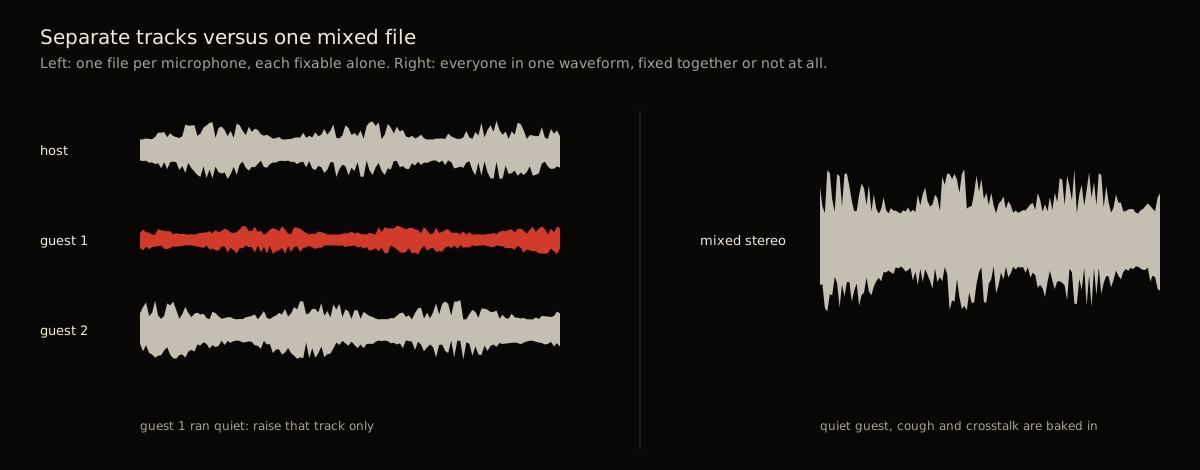
A multitrack recording captures each speaker as its own file. Nothing is combined until someone chooses to combine it. Descript describes the idea plainly: with multitrack recording, “you capture each speaker on a separate track, add additional tracks for music or other effects, then adjust each one to fit your narrative” (Descript, read 2026-09-04).
A mixed file is the opposite decision, made early. Every voice, and any room noise each microphone picked up, is baked into one waveform at the point of recording. There is no “your track” and “their track” left inside it to separate again afterward.
The difference matters most for tone and EQ. Sound On Sound’s guide to live multitrack recording describes leaving equalization decisions until the mixdown stage rather than committing to them while recording (Sound On Sound, read 2026-09-04). Separate tracks let that decision wait, and let it be made per voice. A mixed file forces one EQ decision, for every voice at once, at the moment of recording.
Four problems only separate tracks let you fix
One guest was too quiet. Raise that one track. Nothing else in the episode changes. On a mixed file, raising the whole thing raises the host too. In an editor this is a one-track normalize; Audacity’s manual describes Normalize as a way to “set the peak amplitude of a single track” (Audacity Manual, Normalize, read 2026-09-04).
Crosstalk. Two people spoke over each other and both lines matter. On separate tracks an editor can trim or duck one track under the other and keep both audible. Ducking is a standard effect: Audacity’s Auto Duck “reduces the volume of one or more selected tracks whenever the volume of” a chosen control track rises, which only has something to work with when the voices are on separate tracks (Audacity Manual, Auto Duck, read 2026-09-04). On a mixed file the overlap is one waveform. There is no separate part to move.
A cough or a phone buzz on one microphone. Silence or repair that one track. The rest of the conversation is untouched, including whoever else was talking at that same moment on a different mic.
A host who needs a different EQ than a guest. Voices are not identical, and a mix that flatters one speaker can thin out another. Separate tracks let each voice get its own treatment. A mixed file gets one EQ decision for every voice in it.
A two-guest interview with one soft-spoken guest is the most common reason an editor reaches for the separate tracks instead of the mixed file.
What separate tracks make repairable later, and what they don’t.
| Fixable later with separate tracks | Not fixable |
|---|---|
| One guest’s mic recorded too quiet | A line that was never actually said |
| Crosstalk over a line worth keeping | Distortion from a mic driven too hot |
| A cough or buzz isolated to one mic | Noise that bled into every microphone in the room |
| A host who needs different EQ than a guest | Camera framing or focus, a video problem, not audio |
Separate tracks isolate a problem to one file, but isolating it is not the same as undoing it. A clipped, distorted signal is still distorted, it is just contained to one track instead of smeared across the whole mix. And a line nobody actually said cannot be recovered by any file structure. Separate tracks fix what recording captured badly. They cannot fix what recording never captured.
The live cut is for publishing fast, the raw tracks are for later
A studio that delivers a live cut the same day has already done the immediate job: something is ready to publish without further editing. What to do with the footage covers that in full. For most shows the live cut is publishable as it stands.
The raw tracks are a different kind of deliverable. Most episodes never need them. They sit unused until one does: a line needs isolating for a clip (see getting clips out of a long conversation), a mistake needs fixing after the fact, or someone wants to recut the same conversation into a different show months later. The value of the raw tracks is optionality, not obligation. You are not required to use them. You are stuck if you do not have them and later need to.
What to expect in the files: format, naming, storage
Raw multitrack audio is normally kept as WAV, not MP3. WAV is uncompressed, meaning it retains every recorded sample rather than discarding data to shrink the file, which is why it is standard for editing and archival work rather than for a finished, published episode (Wikipedia, “WAV,” read 2026-09-04). As one working benchmark for how seriously broadcasters treat this, BBC Radio requires 48kHz, 16-bit WAV as its delivery standard for content made for broadcast (same source). MP3 is fine once an episode is done. It is the wrong format for a file you might still need to edit.
The platforms set the target the edit has to hit. Apple’s audio requirements for podcasts recommend an overall loudness “around -16 dB LKFS, with a +/- 1 dB tolerance” and a true peak no higher than -1 dB FS, measured to ITU-R BS.1770-5. For WAV masters the same page lists 44.1 kHz at 16 or 24 bit as the minimum and 24-bit as recommended (Apple Podcasts for Creators, audio requirements, read 2026-09-04). Landing a whole episode on one loudness number is far easier when each voice can be leveled on its own first, which is the separate-tracks case again.
Naming and storage matter less as a rule and more as a way of not losing track of which file is which once a season has more than one episode in it. Each track should say whose voice it is and which date or episode it came from, rather than a bare “track1” or “track2.” Keep the raw tracks in a folder separate from the finished cut, so nobody mistakes a working file for the published one. Back everything up before deleting anything, including the studio’s own copy, since most studios do not keep files indefinitely.
The checklist to confirm before you leave any studio
Ask for these by name before you leave, not after.
What to confirm you have, and when it should arrive.
| File | What it is | Why you want it | When you get it |
|---|---|---|---|
| Live or finished cut | The edited, ready-to-publish version | Fastest path to publishing | Same day, if the studio offers one |
| Raw video, each camera angle | Unedited footage from every camera separately | Lets you or an editor recut differently later | With the rest of the delivery |
| Separate raw audio tracks | Each voice as its own track, not combined | The one file that makes a damaged episode fixable | With the rest of the delivery |
If a studio cannot confirm the third row by name, ask directly before you book: do I get separate tracks, or only a mixed file. The answer changes what is possible to fix six months from now.
What this looks like at Kreate Vision Studio
Podcast Recording in The Hive is $250 an hour with a 90-minute minimum, so the smallest bookable session is $375. Larger blocks run $500 for 2 hours, $750 for 3, $1,000 for 4, $1,400 for 6, and $1,800 for 8. Every block includes three 4K cameras, professional audio, an on-site engineer running the desk, a live multi-camera cut delivered the same day, and separate raw audio tracks. The listing also includes all raw video, including the live multi-cam cuts, alongside the separate raw audio tracks, so nothing in the checklist above is a paid add-on here. The table seats four, a host plus up to three guests, five in the room including the engineer.
None of that depends on asking for it. It is what the booking includes. See what the engineer does in your session for who is actually running the desk, and what’s included and what costs extra for where the line sits between studio time and everything after it. Rates are on the pricing page. The sets themselves are covered in choosing a set for your show.
Book the room, book the 15-minute studio tour, or use the contact page and call (224) 328-2853 to ask what you would walk out with before committing to either.
Sources
- Apple Podcasts for Creators, “Audio requirements,” read 2026-09-04
- Audacity Manual, “Auto Duck,” read 2026-09-04
- Audacity Manual, “Normalize,” read 2026-09-04
- Descript, “Multitrack Recording: Edit, Mix and Add Effects to Your Podcast,” read 2026-09-04
- Sound On Sound, “Live Multitrack Recording,” read 2026-09-04
- Wikipedia, “WAV,” read 2026-09-04
- Kreate Vision Studio rate card, Square Appointments, read 2026-08-24.
What is a separate audio track, and how is it different from a mixed file?
A separate, or multitrack, recording keeps each voice as its own track instead of one combined file. A mixed stereo file combines everyone into a single track at the moment of recording. At Kreate Vision Studio in Palatine, Illinois, every Podcast Recording booking includes both: a finished live cut delivered the same day and the separate raw tracks underneath it, delivered after the session.
What can separate tracks fix that a mixed file can't?
Four things: a guest whose mic ran quiet, crosstalk where two people talked over each other, a cough or a phone buzz on one microphone, and a voice that needs its own EQ. Each fix touches one track without changing anyone else's audio. On a single mixed file, none of that is possible without redoing the recording.
Do I need the raw tracks if I already have the live cut?
Only if you might want a heavier edit later. The live cut is for publishing fast, cut in real time as the conversation happens. The raw tracks are insurance: they sit unused until an episode needs fixing, a line needs isolating for a clip, or someone wants to recut the same conversation differently months later.
What files should I get from a podcast studio?
Three things: the finished cut, the raw video if video was recorded, and separate audio tracks, not a single mixed file. Ask when each arrives and how they are named. At Kreate Vision Studio the live cut comes the same day and the raw video and separate audio tracks follow after the session, nothing held back.